Saturday, February 28, 2009

ACER ASPIRE 4730Z-421G25Mn


The new Aspire 4730Z is a streamlined 14.1" portable entertainment center with exceptional multimedia functionality encased in Acer's new timeless Gemstone notebook design. Powered by the latest Intel® Pentium Dual core processors and packed with all the latest features on the market today the Aspire 4730Z will be your mobile entertainment companion wherever you are.
Brilliant combination of Gemstone design and performance defines the new Aspire 4730Z. It will be a pleasure to carry around the eye-catching Aspire 4730Z enabling better interaction between user and machine. Featuring the integrated Acer CrystalEye webcam, generous harddisk space and handy 5-in-1 card reader the Aspire 4730Z will meet all your mobile entertainment needs.

Product Description:
  • Intel® Pentium® Dual-Core Processor T4200
    (2.0GHz - 1Mb L2 - 800MHz)
  • Intel 40GL Express Chipset
  • 1Gb DDR2 667MHz Memory
  • 250Gb HDD 5400rpm
  • DVD±RW Super Multi Drive
  • 14.1" WXGA Acer Crystalbrite
  • Intel ® Graphics Media Accelerator 4500M up to 285Mb
  • High speed 56K modem
    GigaLAN 10/100/1000 Mbps
    Intel PRO Wireless 3945ABG 802.11/b/g
  • 1xVGA, 3xUSB 2.0 ports, 1xRJ-11, 1xRJ -45, 1xHeadphone, 1xmicrophone-jack, ExpressCard™/54 slot
  • Integrated Bluetooth
  • Integrated Acer Crystal Eye Webcam
  • Linpus TM Linux®
  • Warranty 1 Year by Acer
Compatible for Vista, XP, and Windows 7


Reblog this post [with Zemanta]
Read More..

Thursday, February 26, 2009

Prevent your BACKDOOR

Backdoors are often installed by attackers who have compromised a system to ease their subsequent return to the system. We consider the problem of identifying a large class of backdoors, namely those providing interactive access on non-standard ports, by passively monitoring a site's Internet access link. We develop a general algorithm for detecting interactive traffic based on packet size and timing characteristics, and a set of protocol-specific algorithms that look for signatures distinctive to particular protocols. We evaluate the algorithms on large Internet access traces and find that they perform quite well. In addition, some of the algorithms are amenable to prefiltering using a stateless packet filter, which yields a major performance increase at little or no loss of accuracy. However, the success of the algorithms is tempered by the discovery that large sites have many users who routinely access what are in fact benign backdoors, such as servers running on non-standard ports not to hide, but for mundane administrative reasons. Hence, backdoor detection also requires a significant policy component for separating allowable backdoor access from surreptitious access.
(source : http://www.icir.org/vern/papers/backdoor/)


If your computer connect to internet or network, it can be so easy by other look what you're doing on your computer. PC's that connect to internet or other network will sent any information to stay connected. This became the way by Outsider sniff on your computer. To prevent this you need firewall. Windows has their own firewall, but this is not enough. You need other third parties tool.

My suggestion software that you use to keep your PC's is:
  1. Zone Alarm Pro
  2. COMODO Internet Security
  3. Armor Firewall
  4. F-Secure Internet Security
  5. Prisma Firewall
  6. 4 Net Firewall
  7. ESET Smart Security
  8. PC Tools Firewall
  9. Others
In the other way you can close your open port that you don't need


Read More..

Wednesday, February 25, 2009

Right Click (Disable)

Windows ExplorerImage via Wikipedia

If you do this, there will no one can do right click on your Dekstop and Explorer

This you must do:
1. Start --> Run
2. Type "Regedit" -->OK
Find this..!
Key : HKEY_CURRENT_USERSoftwareMicrosoftWindows CurrentVersionPoliciesExplorer
Value Name: NoViewContextMenu
Data Type: REG_DWORD
Data: (0 = disabled, 1 = enabled)

Very simple isn't it

Reblog this post [with Zemanta]
Read More..

Tuesday, February 24, 2009

Speed Up Your PC's

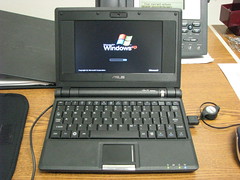
Asus Eee:  Booting Windows XP HomeImage by geognerd via Flickr

Make your computer start faster

Getting the computer up and running involves several stages. There are various tweaks that can be applied for each stage to speed things up. In my own experience, only a few make much difference. Some references are given by others. The most important improvement by far comes from controlling the programs that are loaded at start up.

The boot process involving the BIOS
There are a variety of tweaks that are possible in this first stage but I have never found one that did more than shave a second or two here and there. Furthermore, the BIOS is terra incognita for the average PC user.


About Bootvis.exe
This graphical Microsoft developer tool is mentioned and recommended as a way to speed up booting in countless places. I see it so often that I felt constrained to devote a separate section to it. This is what Microsoft has to say
"Please note that Bootvis.exe is not a tool that will improve boot/resume performance for end users. Contrary to some published reports, Bootvis.exe cannot reduce or alter a system's boot or resume performance. The boot optimization routines invoked by Bootvis.exe are built into Windows XP. These routines run automatically at pre-determined times as part of the normal operation of the operating system"
From what I understand (I'm no expert) a brand-new setup might take a couple of days before Windows XP finishes optimizing and, if you just can't wait, Bootvis.exe might help you optimize right away . But, basically, you can forget about using this tool in spite of what everybody keeps saying. You can't even download it from Microsoft anymore although there are sites that still have it. There seem to be several versions and one or more may not work in SP2.
In any event, it seems it is possible to carry out some of the type of optimization done by this tool just by using RUNDLL32.EXE. In Start-Run. Enter the command
RUNDLL32.EXE advapi32.dll,ProcessIdleTasks

Loading Windows
Windows XP loads pretty fast but there are some ways to hurry it up a bit. Unfortunately, a lot of the stuff you read isn't too useful. Here are a few of the common suggestions.

1. A study has shown that cutting down on the number of fonts being loaded will speed things up. If you have many hundreds of fonts, you might consider removing some.
2. There is a lot of discussion of configuring "Prefetch" and the related subject "boot defrag". The average PC user can ignore these subjects since Windows XP basically takes care of this area on its own. These configurations are part of what the utility "Bootvis.exe" discussed above was supposed to help manage. If you must tinker, do the RUNDLL32.exe command given above in the Bootvis.exe section. However, forget the often-mentioned idea of regularly deleting the contents of the \Windows\Prefetch\ folder. In fact, deleting Prefetch will initially slow down the boot until the folder is rebuilt.
3. The Start menu in Windows XP contains an entry, My Recent Documents, where a list of all the recent documents that you have opened or used is kept. This provides a quick way to reopen any document. After a while the list can get quite long and it has the effect of slowing the bootup process. What isn't obvious is that the list of files that can be accessed from the My Recent Documents entry in the Start may be only the tip of the iceberg. The folder, %USERPROFILE%\Recent, where the entries are stored may have many more. This folder should be cleaned regularly. This can be done manually or automatically every time you log off. To make the cleanup automatic you can edit the Registry. (The usual caveats about Registry editing apply.) In the Registry editor Regedit, navigate to this key: HKEY_CURRENT_USER\Software\Microsoft\Windows\ CurrentVersion\Policies\Explorer Create a DWORD value named ClearRecentDocsOnExit and give it a data value of 1. Shortcut entries for “My Recent Documents” will still be collected during a login session but will then be cleared at logoff.

Note: This tutor is offered without any guarantees and the user assumes all responsibility for its use.

Drivers and hardware
Part of the boot process is loading and initializing the hardware.

1. Keep the drivers for your peripherals and other hardware up-to-date. This may require checking regularly at the Web sites of the manufacturers. If you have older equipment, be sure that you are using drivers written for Windows XP.
2. You may want to disable rarely used peripherals or hardware services. Possible examples are game ports, IR ports, MIDI devices, and Firewire. Disabling devices does not remove them and they can be re-enabled if desired. Use Device Manager to make changes.


Networking tweaks
Network cards can be a substantial drag on startup time since they can spend a lot of time getting network addresses. Also if you have a lot of network protocols , loading them can take time.

1. If you have a home network and are using automatic IP assignments, you may be able to speed things up by assigning permanent IPs to the computers on your network. Consult the instructions for your router.
2. 2. If you are using DSL and connect by PPPOE directly to a modem (not a router) you definitely want to assign a permanent IP to your network card. Otherwise, there is a considerable delay while the card hunts for an address when you boot. Consult your ISP for instructions. Also see other reference.


Limiting the programs and services that start up
This area is where the big savings in time can be made. The average PC user probably has far too much stuff loading at start up. Also, Windows starts up a lot of services by default that many systems do not need. The measures to take are covered in great detail on pages elsewhere on this site. How to use the Windows System Configuration Utility (Msconfig) and the Services Console to control both programs and services is discussed. There is also some excellent freeware to help manage your startup and one program, like WinPatrol, Making the system run better. Controlling what starts up is also a major way to make your system faster and more efficient once it is up and running.

Reblog this post [with Zemanta]
Read More..

Monday, February 23, 2009

Lost your paid software serial number..??

Photo taken by myselfImage via Wikipedia

How Do I Find My Paid Software Serial Number?"


Before you can install your paid software you'll need to find the serial number that came with the program. Your software requires that you enter a unique serial number before using it. If you've lost your serial number, there may be a way to find it as long as your program is still installed. You might be able to find your software serial number if you've uninstalled the program but only if the serial number information was left in the Windows Registry.

The Paid Software serial number is actually more of a product key than a serial number but the terms are often used interchangeably.

Answer: The best way to find your paid software serial number may be with a product key finder program.

Here are the most popular programs that find serial numbers and product keys:

1. Magical Jelly Bean Keyfinder

The Magical Jelly Bean Keyfinder program is a free utility that retrieves product keys from the registry. It also has the ability to find product keys for Microsoft Office programs, along with product keys from many other non-Microsoft programs.


Advantages include very small size, ease of use, no installation required, instant display of product keys and multiple product key saving options.

Finds Keys for Operating Systems: Microsoft Windows 95, Windows 98, Windows ME, Windows 2000, Windows XP, Windows Server 2003, Windows Server 2008, and Windows Vista.
Finds Keys for Other Software: Microsoft Office 2007, Office 2003, Office XP, and several non-Microsoft programs.


2. Winkeyfinder

The Winkeyfinder program is another free utility that retrieves product keys from the Windows registry.

Advantages include small program size, no installation required, and additional features such as a password generator, the ability to change registered user information, and activation backup capabilities.

Finds Keys for Operating Systems: Microsoft Windows Vista, Windows XP, Windows Server 2003, Windows 2000, Windows ME, and Windows 98.
Finds Keys for Other Software: Microsoft Office 2007, Office 2003, Office XP and Office 2000 SP2, and Office 97.

3. RockXP

RockXP is another free program that retrieves lost product keys from the registry.

Advantages include small program size, no installation required, and additional features such as a password generator and password retriever.

Finds Keys for Operating Systems: Microsoft Windows XP.
Finds Keys for Other Software: Microsoft Office 2003 and Office 2007.

4. KeyFinder Pro

Gear Box's KeyFinder Pro 2007 is another fantastic utility that can find your Windows product keys. It can also find product keys for several Microsoft Office programs.

Advantages include a very small download size, no installation required, no compressed files to extract, and nothing to run. KeyFinder Pro instantly displays product keys and allows you to save or print them for safe keeping.

Finds Keys for Operating Systems: Microsoft Windows 2000, Windows XP, Windows 2003, and Windows Vista.
Finds Keys for Other Software: Microsoft Office 2007, Office 2003, and Office XP.

5. Keyfinder Thing

Keyfinder Thing is another free, easy to use utility that finds product keys and serial numbers hidden in the Windows registry.

Advantages include small program size, nothing to run, and support for a large list of non-Microsoft programs.

Finds Keys for Operating Systems: Microsoft Windows ME, Windows NT, Windows 2000, Windows XP, Windows 2003 Server, and Windows Vista.
Finds Keys for Other Software: Microsoft Office 2007, Office 2003, Office XP, Microsoft Money, Nero 7, Corel Suite 11, The Sims 2, and many more programs.

6. WinGuggle

WinGuggle is a very simple key finder program. WinGuggle easily finds product keys for popular Microsoft Windows operating systems and several Microsoft Office programs.

Major advantages include a quick download size, no installation required, access to a few advanced tools, and a very simple interface. WinGuggle instantly displays your Windows and Office product keys.

Finds Keys for Operating Systems: Microsoft Windows XP and Windows Vista.
Finds Keys for Other Software: Microsoft Office 2007, Office 2003, and Office XP.

Important Product Key Finder Information

If your system was purchased with Microsoft Windows pre-installed, and you have not reinstalled it or upgraded it yourself, the key finders on this page may only find the generic product key that your computer manufacturer used to install the operating system.

This product key may not work when attempting to reinstall Windows. In this case, you must use the unique product key that is on the sticker attached to your computer case.


Read More..

Sunday, February 22, 2009

Windows Sidebar for Windows XP

Windows SidebarImage via Wikipedia

The "Windows Sidebar" is now well known, but included in Windows Vista. This is known from August (as reported). In September, Bill Gates to build a new beta of Windows Vista was introduced, the "Windows Sidebar" was included.
In the "Windows Sidebar allows users dynamic information such as time, or a slide show feed. Individual items are "gadgets" and Microsoft wants developers the opportunity to demonstrate their own gadgets for Sidebar development. Meeting place for aspiring gadget is on the website http://microsoftgadgets.com/.


Some fans have in the current and the Internet (cracked) Windows Vista "Windows Sidebar" and uses an emulator developed by the sidebar in Windows XP is running. It will not be Microsoft Internet files, but only the emulator. If you have Windows Vista, can mittlels the "Windows Sidebar" files and the emulator in the sidebar to Windows XP running.

Both for the story. In his blog is now a Sean Alexander, Senior Program Manager for Windows at Microsoft, the Windows emulator for the sidebar. He noted that he had nothing to say because the Windows Sidebar Microsoft has not officially published. Only in the Windows Vista Beta 2 - officially - is included.

However, the opportunity to clarify something. "Gadgets for XP will also be available - officially," Alexander said in his blog. Conversely, this means, however, that the "Windows Sidebar is available for Windows XP. Maybe not a 1:1 copy of the sidebar in Windows Vista, but at least something.

This Alexander expresses directly. Instead, just do not want that gadget developers may soon be frustrated if they discover they are the gadgets platform developed poorly. "It's very exciting to see what excitement the Windows Sidebar will be," said Alexander, adding that Microsoft is currently "big plans" are used.

The gadgets are similar in principle to what Apple has already provided for MacOS X. For Windows, there are already familiar with the Java-based freeware Konfabulator an alternative. These are "widgets" on the Windows desktop to spice it up. Learn more about Konfabulator is available on the PC World News: "Konfabulator: Free Windows desktop widgets to spice up."


Read More..

Welcome to my blog..Stay informed..!

Eye see youImage by conorwithonen via Flickr

Hello there NetVenture friend!. If you like this blog or the article post on it, please spread the word by sharing this blog/post with your friends.


Read More..